

After the recent release of WordPress 2.5 I decided to give the update a shot on Blog.SpoonGraphics. The upgrade went almost issue free with lots of nice new features now at my disposal! Here is a brief overview of my favourite improvements and remedies to a few minor problems and issues.
My Favourite New Features
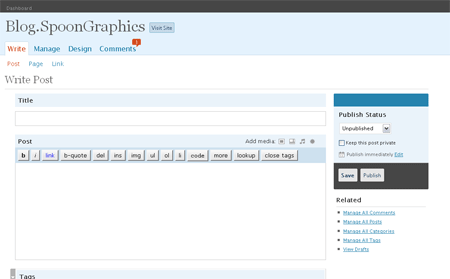
The first thing that greets you after the upgrade is the nice fresh administrator theme. The mixture of baby blue and grey is a cool modern image. After a short while I soon got to grips with the new low-fat menu layout!
One major improvement that comes with 2.5 is the inclusion of many new features, so many in fact I was actually able to remove a number of plugins, with the additions they provided now included as default.
Two such plugins included Multifile Upload and MyAvatars, now replaced by the built in media uploader and default Gravatar support.
On the topic of plugins, the automatic updater is very cool, making installing the latest releases a breeze. Instead of downloading the latest files from the author’s website, uploading them to your server and reactivating them through the admin panel, you can now simply update each one with the click of a button.
When writing your posts, you can flick onto HTML mode for quick tweaks here and there as well as insert media such as images and video directly from the new Flash uploader – Nice features but the cause of a slight problem for me, read more below.
Elsewhere there has also been a vast improvement in the Blogroll side of things, where users can now include multiple categories and lists of links in their sidebar.

Gravatar Theme Modification
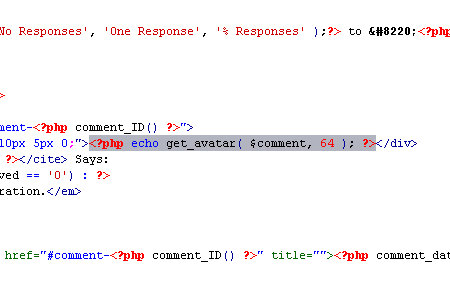
In order to make use of the new Gravatar support, I firstly uninstalled the MyAvatars plugin which had previously held the job of placing a MyBlogLog or Gravatar image next to each commentor name. To allow the WordPress’ new Gravatar feature I simply had to add the following code into the themes Comments.php file at at line 30:
Popularity Contest Plugin Errors
Another issue that was experienced shortly after the upgrade was the error that appeared when trying to reactivate Alex King’s Popularity Contest Plugin. Luckily the solution was only a Google search away and the problem was soon resolved after visiting Ken McGuire’s blog.
Simply open up popularity-contest.php from your plugins folder, scroll down to line 59 and delete out one of the two sets of ‘../’ from the call for wp-blog-header.php. Re-upload the file and find the plugin now activates.
WordPress 2.5 Image Uploader Error
The most painful of problems I experienced was with the fancy new media uploader… which tended not to want to upload any media. After selecting an image the uploader would ‘Crunch’ the file but fail with a http error. Many solutions were tried from the WordPress support thread but this particular fix saved my blog:
Open up the .htaccess from your WordPress install directory and insert the following:
<IfModule mod_security.c>
<Files async-upload.php>
SecFilterEngine Off
SecFilterScanPOST Off
</Files>
</IfModule>
As highlighted on Josh Highland’s Blog.
The ability to upload multiple images at once is great for Blog.SpoonGraphics with the high picture counts found in the tutorials.
So, have you made the jump to WordPress 2.5 yet? Or are you waiting for the initial problems to be ironed out before going for the full change?!

Nice article, ill’ try WP2.5 next week!,
Cheerz from Uruguay,
Glad I could be of some assistance with the Popularity Contest issue. Noticed it in trying to get plugin installed after doing a WP2.5 setup (where it doesn’t install at all, even create the DB tables). All is good in the world again :)
Thanks for the gravatar info.
Can’t believe you had no problems with the plugin upgrade feature. Mine is just scary looking with errors.
I jumped to the new versión yesterday and it happened coincide with the launch of my new illustration web site so everything looks brand new to me!!!
I love the new WP version, I’ve been waiting for a long time. I was wasted with some editor issues but now is just right and I thuink I’m already used to it. :)
Wow that was a shock to see my picture in the middle of your post. I upgraded the day it came out… the best feature I think is the 1 click plugin upgrade.
Hey I agree with you, Gravatr implantation is very cool ! ans WP 2.5 is very intuitive ;-)
After reading your post, I think I might take the plunge myself. The new features sound too interesting to pass up.
I really like the new look and wordpress.org is beautiful.
I’m planning to go to new WordPress release as soon as I find some time to upgrade.
Just a quick question how can I edit the gravatar bit so that it aligns it to the left?
Jacqui – looks like you already achieved that, but anyway… the get_gravatar gives the image the class “avatar”, you can style it through that.
Thanks for the comments, I hope all your upgrades have gone issue free!
Jacqui – I personally wrapped the get_avatar tag in a floated div styled with a little margin, but Kristarella also has a good solution above.
Chris
Loving the new WordPress!
I’d never looked at WP ’til 2.5 came out, and I love it. It’s a really great tool and surprisingly easy to tame.
Surprised at all the positive WP comments. Agree the install is simple and hasstle free.
I found all the problems with the new back end and the new layout a little dissapointing. I rolled back to 2.3.3
I’d recomend anyone to install it on a test site first.
Which problems Steve? Just so others can determine if they’re worth the risk, and to see if they’re the same as mine.
just disable flash and you will have the image uploader back :]
WtJMMv Blogs rating, add your blog to be rated for free:
http://blogsrate.net